
Overview
Dark mode support ensures your mathematical equations remain readable and aesthetically pleasing in both light and dark themes. The app automatically detects and adapts to Confluence’s theme settings.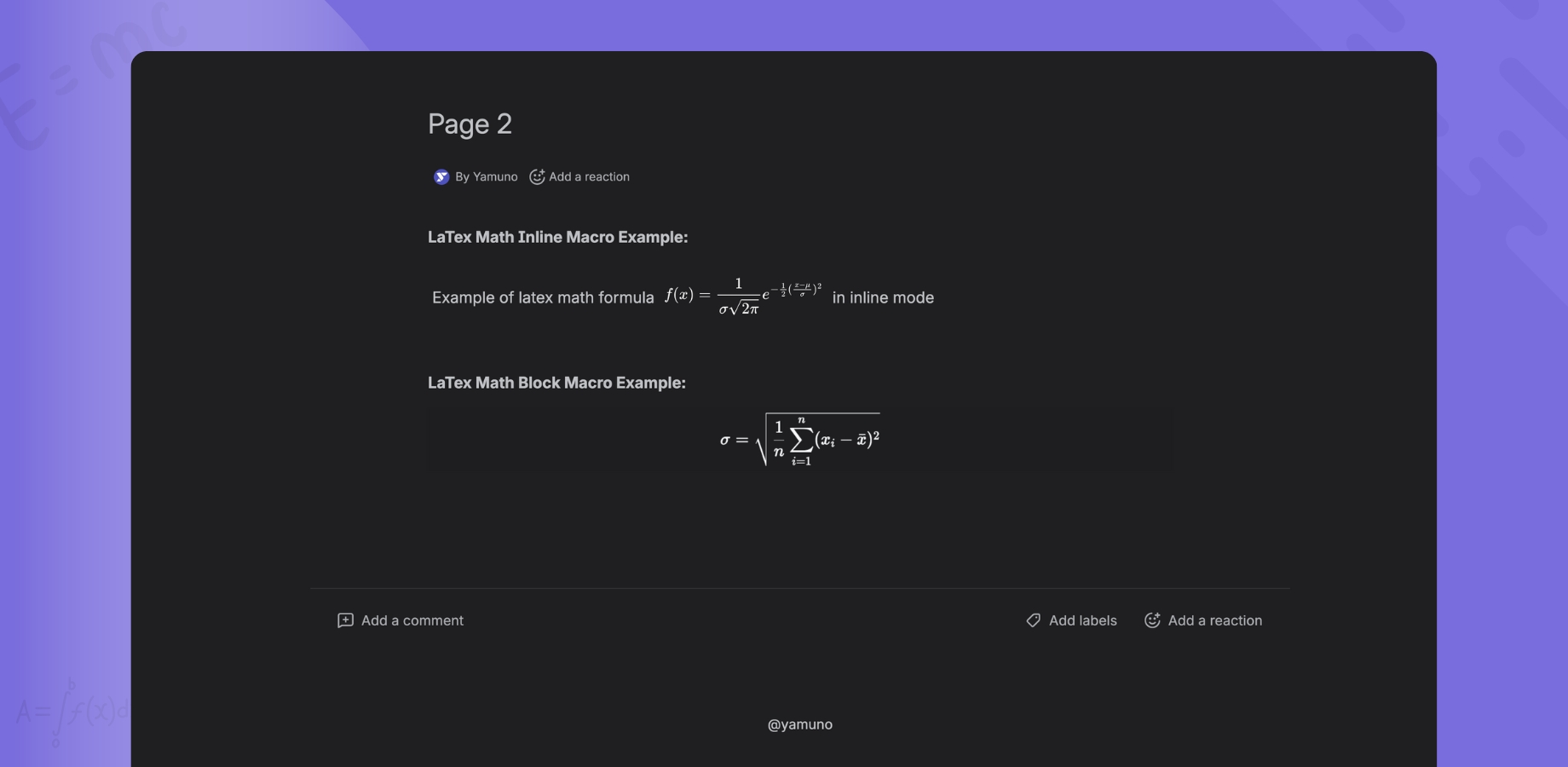
Features
- 🌙 Automatic Detection - Detects Confluence theme automatically
- 🎨 Seamless Integration - Equations blend with Confluence’s color scheme
- ⚡ Instant Switching - No refresh needed when changing themes
- 👁️ Optimized Contrast - Readable in all lighting conditions
- 🎯 Consistent Experience - Same quality in light and dark modes
How It Works
Automatic Theme Detection
The app uses Atlassian’s theme detection API:- Confluence Theme Changes → App detects the change
- Automatic Update → Equations update colors instantly
- No Configuration → Works out of the box
Theme Support
Light Mode- Dark text on light background
- High contrast for readability
- Standard mathematical typography
- Light text on dark background
- Reduced eye strain
- Adjusted contrast ratios
Enabling Dark Mode
In Confluence
- Click your profile picture (top right)
- Select Settings
- Go to Theme
- Choose:
- Light - Light mode
- Dark - Dark mode
- System - Follow OS settings
The App Adapts Automatically
Once you change Confluence’s theme:- ✅ All LaTeX equations update instantly
- ✅ Editor interface matches theme
- ✅ Preview pane updates
- ✅ No page refresh needed
Visual Examples
Light Mode Appearance
Inline Equations:- Black text on white background
- Clear, crisp rendering
- Optimal daytime viewing
- Centered with standard typography
- High contrast
- Professional appearance
Dark Mode Appearance
Inline Equations:- Light text on dark background
- Reduced eye strain
- Comfortable nighttime viewing
- Adjusted contrast
- Softer colors
- Maintains readability
Editor Experience
Light Mode Editor
Code Pane:- Light background
- Dark text
- Syntax highlighting optimized for light mode
- White background
- Black equations
- Simulates light mode Confluence page
Dark Mode Editor
Code Pane:- Dark background
- Light text
- Syntax highlighting optimized for dark mode
- Dark background
- Light equations
- Simulates dark mode Confluence page
Color Adjustments
Text Colors
Accent Colors
Primary colors (like links) use Confluence’s theme colors:- Automatically adjusted for each theme
- Maintains brand consistency
- Ensures proper contrast
Accessibility
Contrast Ratios
Light Mode:- Text contrast: 21:1 (exceeds WCAG AAA)
- High readability
- Text contrast: 15:1 (exceeds WCAG AAA)
- Reduced glare
- Comfortable for extended reading
Benefits
- ✅ Reduced eye strain in low light
- ✅ Better for nighttime work
- ✅ Improved focus on equations
- ✅ Accessibility compliant
Best Practices
✅ Do’s
- Test both themes - Verify equations look good in both
- Use standard LaTeX - Avoids rendering issues
- Leverage automatic detection - Don’t fight the theme
- Consider your audience - Many users prefer dark mode
❌ Don’ts
- Don’t hardcode colors - Let the app handle theme colors
- Don’t use color for meaning - Some users can’t distinguish
- Don’t override theme - Respect user preferences
- Don’t assume light mode - Test in both themes
Troubleshooting
Equations Not Updating Theme
Problem: Equations stay in light mode when switching to dark Solutions:- Hard refresh the page (Ctrl/Cmd + Shift + R)
- Clear cache and reload
- Check Confluence theme is actually set to dark
- Verify browser supports theme detection
- Contact support if issue persists
Poor Contrast
Problem: Equations are hard to read in dark mode Solutions:- Adjust monitor brightness
- Try Confluence’s theme settings
- Verify no custom CSS is interfering
- Report issue to support with screenshots
Editor Theme Not Matching
Problem: Editor doesn’t match Confluence theme Solutions:- Close and reopen the editor
- Refresh the Confluence page
- Check browser console for errors
- Try different browser
Colors Look Wrong
Problem: Equation colors don’t match expectations Solutions:- Verify theme is properly set in Confluence
- Check for browser extensions affecting colors
- Disable custom styles if any
- Compare with other Confluence content
Theme Switching
Instant Updates
When switching themes:- No page refresh required
- All macros update simultaneously
- Editor adjusts if open
- Smooth transition - no flashing
Performance
Theme switching is optimized:- ⚡ Updates in less than 100ms
- 🚀 No performance impact
- 💾 No additional load time
- ✅ Works with hundreds of equations
Technical Details
CSS Variables
The app uses CSS variables for theme colors:Theme Detection API
Uses Atlassian’s@atlaskit/tokens:
Color Inversion
Not a simple color inversion:- Custom color palette for dark mode
- Optimized contrast ratios
- Maintains mathematical typography
Mobile Support
Responsive Theme Detection
Dark mode works on:- 📱 iOS devices (system theme)
- 🤖 Android devices (system theme)
- 💻 Tablets (Confluence theme)
- 🖥️ Desktop browsers
Battery Saving
Dark mode can help:- Reduce screen power consumption (OLED displays)
- Extend battery life on mobile
- Less eye strain
System Theme Integration
”Follow System” Option
If Confluence is set to follow system:- OS changes theme (day/night)
- Confluence updates automatically
- LaTeX equations adapt instantly
- Seamless experience
Supported Operating Systems
- ✅ Windows 10+ (Dark Mode)
- ✅ macOS 10.14+ (Dark Mode)
- ✅ Linux (Desktop Environment dependent)
- ✅ iOS 13+ (Dark Mode)
- ✅ Android 10+ (Dark Theme)
Custom Confluence Themes
Third-Party Themes
The app attempts to adapt to custom Confluence themes:- Detects custom color schemes
- Adjusts equation colors
- May require manual testing
Known Limitations
Some custom themes may:- Have non-standard contrast
- Use unexpected color schemes
- Require additional adjustments
💡 Tip: Test your equations in your custom theme and report any issues.
Future Enhancements
Planned Features
- 🎨 Custom color schemes
- 🌈 High contrast mode option
- ⚡ Color customization
- 📊 Accessibility improvements
Request Features
Have suggestions? Contact usComparison with Other Apps
LaTeX Math for Confluence
- ✅ Automatic theme detection
- ✅ Instant switching
- ✅ Optimized contrast
- ✅ No configuration needed
- ✅ Mobile support
Traditional LaTeX Renderers
- ❌ Manual theme selection
- ❌ Page refresh required
- ❌ Poor dark mode support
- ❌ Fixed colors
- ❌ Desktop only
Related Documentation
- 📖 Live Preview - Editor features
- 📖 Inline Macro - Inline equations
- 📖 Block Macro - Display equations
- ❓ FAQ